
Loading...
Loading...
Scheduling Software
Most overtime is not approved. It accumulates while nobody is looking and shows up on the check. EasyClocking scheduling puts availability, qualifications, and running hours in one view, alerts you before a threshold is crossed, and runs every site on the same rules. The schedule and the punch live in the same system, so scheduled versus actual is flagged the moment it happens.
Trusted by 10,000+ teams in America's toughest industries
The Coverage Problem
In most companies, the schedule gets built the same way every week. A supervisor looks at who is around, fills the gaps from memory, and moves on. Nobody can see running hours, so nobody knows a worker is at 38 hours on Thursday until the timesheet says 46 on Monday.
Add a second site and it gets worse. Each location keeps its own spreadsheet, its own rules, and its own idea of what coverage looks like. There is no single view of headcount, hours, or cost until the pay period is already closed.
Here is what that looks like in practice:
A transportation company runs 40 drivers. Dispatch fills routes as they come in, and nobody sees the hours stacking up until payroll. Six drivers cross into overtime every week. The company pays it, every week, without ever deciding to.
A manufacturing plant runs three shifts. Two operators call out before first shift. The supervisor works down a phone list, gets one replacement, and starts the line short. The one who did come in gets held over into overtime because there was no faster way to find someone qualified.
A construction company runs 80 workers across four active sites. Each superintendent builds their own schedule in their own spreadsheet. Nobody can see total headcount, total hours, or which crews are stretched until the job cost report lands two weeks after the work is done.
None of these are scheduling problems on their own. They are cost problems, coverage problems, and payroll problems that started with a schedule nobody could see.
A schedule you can see is a schedule you can control, before the hours are worked and the money is spent.
Replace the Habit With a Process
See who is available, who is qualified, and who is already close to an overtime threshold, all in one view. Build the week from what the system knows instead of what the supervisor remembers.
Workers see their shifts, claim open ones, and request swaps from the same system managers use. No printed sheet on the breakroom wall, no calls to the office to ask what time to show up.
Track overtime hours by worker, crew, and site in real time. Alerts fire before thresholds are crossed, so you decide whether to approve the hours instead of discovering them on the check.
When someone calls out at 5 a.m., the system surfaces qualified, available workers who are not already headed for overtime. Post the shift, get it claimed, and keep the line or the crew running.
Overtime thresholds, rest periods, and shift patterns are configured once and applied at every location. Multi-site operators stop maintaining a different set of habits at each address.
Three steps. Coverage and cost visible at every one.
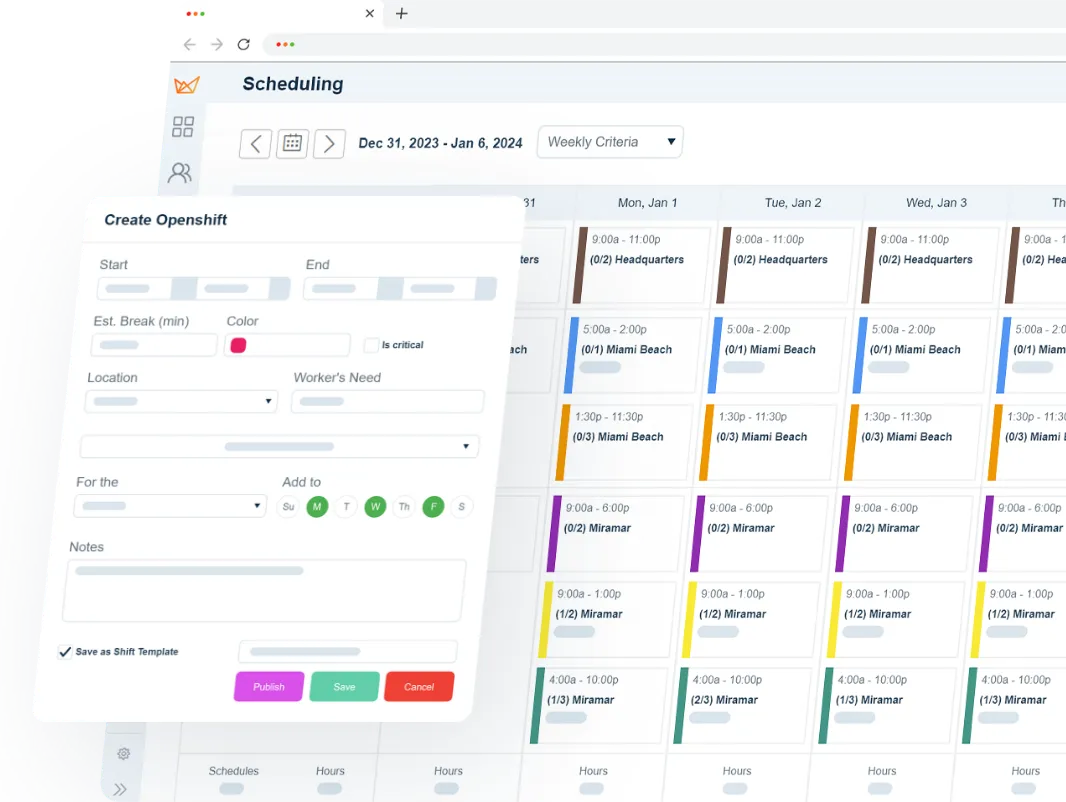
Drag and drop with live visibility into availability, qualifications, overtime hours, and labor budget. Build the week in minutes and know what it costs before you publish it.
The schedule publishes instantly to mobile. Workers can view their shifts, request swaps, claim open shifts, and flag conflicts, all in one place.
When a gap appears, the system surfaces qualified, available workers and shows what each assignment does to overtime. You fill the shift knowing the coverage and the cost.
Overtime is the most expensive hour on your payroll and the easiest one to miss. When running hours are invisible until the timesheet closes, you are not managing overtime. You are reporting it after the fact and paying the premium either way.
A line that starts short, a crew that shows up one hand light, a truck that leaves late. Every one of those traces back to a callout that took 40 minutes of phone calls to fill instead of two minutes of posting an open shift.
Scheduling is one of the top reasons hourly workers leave. Last-minute changes, no visibility into next week, and no way to swap a shift push good people out the door. Replacing them costs more than covering them would have.
Get a custom quote for your workforce, no commitment required.
Everything you need to cover the week and know what it costs.
Build recurring schedules, one-off shifts, and rotating patterns. Copy last week’s schedule or start from scratch. Drag, drop, done.
Post open shifts for qualified workers to claim. First-come or manager-approved, your call. Coverage gets filled without a round of phone calls.
See overtime hours by worker, team, and site in real time. Alerts fire before thresholds are crossed, while you can still change the assignment.
PTO requests, approvals, and balance tracking in one place. The schedule adjusts automatically when time off is approved.
Workers request swaps directly in the app. Manager approves or declines with one tap. No phone chains, no confusion.
Workers see their schedules, claim shifts, and request changes from their phones. No calling the office. No checking the whiteboard.
Scheduled hours flow directly into time and attendance. Variances between scheduled and actual are flagged automatically, so the schedule and the timesheet tell the same story.
Overtime thresholds, rest period requirements, minor labor laws, and maximum hour limits are built into the scheduling logic. The system won’t let you build a schedule that violates the rules.
Most scheduling tools were built for retail. This one was built for the floor.
Deputy, Quinyx, and the rest solve a real problem: staff a store or a restaurant at the right headcount for the right hours. That is a different job than covering three shifts in a plant, four active jobsites, or a dock and a fleet on separate pay rules.
Clock-forward work has constraints those tools do not carry: union agreements, shift differentials, certifications that gate who can run which machine, prevailing wage, and crews that move between sites mid-week. EasyClocking handles those as scheduling rules, not exceptions you manage on the side.
The bigger difference is where the punch lives. In most stacks, the schedule sits in one tool and the time clock sits in another, and the two only meet in a report. Here they are the same system, so a variance between scheduled and actual is flagged the moment it happens rather than found during payroll prep.
That is what makes the schedule worth building. Not a prettier calendar. A number you can act on while the week is still in front of you.
Four products, one record. Biometric clocks verify who punched. Time & attendance software turns punches into payroll-ready hours. Scheduling controls coverage and overtime. Payroll integration moves clean hours into the system you already run.
See how all four products work togetherFree weekly brief
Practical strategies for covering shifts across multiple sites, keeping overtime visible before it hits payroll, and cutting the time it takes to build a week.
No spam. Unsubscribe anytime.
The system tracks hours by worker, team, and site in real time and alerts managers before an overtime threshold is crossed, not after payroll runs. When you assign a shift, you can see what it does to that worker’s weekly total first. That turns overtime into a decision you make instead of a number you find out about on the check.
Yes. Workers see the full schedule and any open shifts through the same system managers use. They can claim shifts, request swaps, and flag conflicts from their phones. That cuts the calls to the office and gets coverage confirmed faster than a phone chain does.
Yes. Scheduled hours flow directly into time and attendance. Variances between scheduled and actual hours are flagged automatically, so managers see deviations in real time instead of three days later at payroll. That is where most of the payroll cleanup disappears.
Compliance guardrails are built into the scheduling logic. Overtime thresholds, rest period requirements, minor labor laws, and maximum hour limits are enforced automatically. The system won’t let you publish a schedule that breaks the rules, which keeps violations out of the pay period instead of out of the audit.
Most scheduling tools are built for retail and hospitality, where the schedule lives on a phone and the punch does too. Ours is built for clock-forward work: multiple sites, rotating crews, union and shift-differential rules, and workers who punch on a physical clock. The schedule and the punch sit in the same system, so scheduled versus actual variances get flagged the moment they happen. That connection is what makes the schedule useful at payroll, not just at planning.
EasyClocking is part of the WorkEasy Software family of time tracking tools.
Join 10,000+ companies in America's toughest industries who trust EasyClocking for punches tied to the real person and hours their payroll can use as-is.